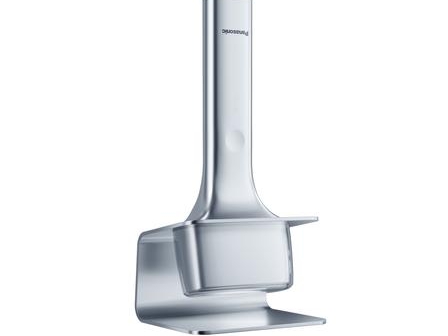
T 形简约几何形状,超薄设计,重量仅 80 克,通过压敏按钮控制。
T 形简约几何形状,超薄设计,重量仅 80 克,通过压敏按钮控制。
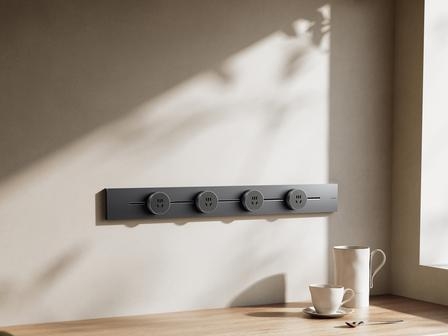
采用轨道设计,可自由添加、移动或移除插座适配器,兼具灵活性、安全性和美观性。
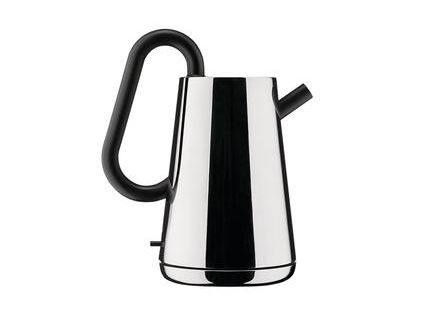
手柄穿过壶身侧面,造型简洁。
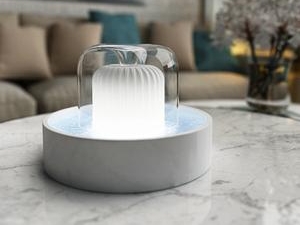
采用纤薄、扁平设计,推面板出水口会露出,接水托盘也会弹出,方便操作。
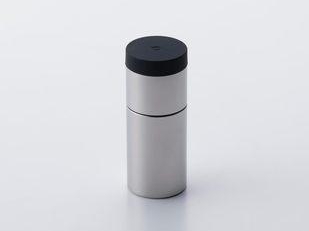
摒弃旋转式结构,采用 “敲击” 机制。

夹口为三角形,翻页和固定时更为顺畅。

在WordPress中,文章的ID不仅在wp_posts表中存储,还在其他相关的表中存储。如果你想将文章ID从1217修改为1759,并且需要同时更新相关联的表格,请按照以下步骤进行:
备份你的数据库。这是非常重要的,以防止意外情况发生。
登录到你的数据库管理工具(如phpMyAdmin)。
找到并选择你的WordPress数据库。
找到并选择以下表格:
wp_posts:文章主表格,其中包含文章的基本信息。
wp_postmeta:文章的元数据表格,包含文章的附加信息和自定义字段。
wp_comments:评论表格,如果文章有评论,评论也将与文章相关联。
wp_term_relationships:分类和标签关系表格,如果文章有分类或标签,它们也将与文章相关联。
在wp_posts表格中,找到ID为1217的文章记录。将其ID修改为1759。
在wp_postmeta表格中,找到post_id为1217的记录。将其修改为1759。
在wp_comments表格中,找到comment_post_ID为1217的记录。将其comment_post_ID修改为1759。
在wp_term_relationships表格中,找到object_id为1217的记录。将其object_id修改为1759。
保存修改,并退出数据库管理工具。
请注意,这只是修改文章ID的基本步骤。如果你的网站使用了其他插件或自定义功能,可能还会有其他相关的表格需要修改。在进行任何修改之前,请确保你对数据库操作有一定的了解,并且在修改之前备份你的数据。另外,修改文章ID可能会导致一些问题,如链接失效、关联数据丢失等。因此,请谨慎操作并进行充分的测试。如果你不熟悉数据库管理,请寻求专业帮助。
以下为SQL实例代码
-- 修改wp_posts表格中的文章ID
UPDATE wp_posts SET ID = 1759 WHERE ID = 1217;

-- 修改wp_postmeta表格中与文章相关的记录
UPDATE wp_postmeta SET post_id = '1759' WHERE post_id = '1217';

-- 修改wp_comments表格中与文章相关的评论记录
UPDATE wp_comments SET comment_post_ID = 1759 WHERE comment_post_ID = 1217;

-- 修改wp_term_relationships表格中与文章相关的记录
UPDATE wp_term_relationships SET object_id = 1759 WHERE object_id = 1217;在js中添加自执行函数,给console添加save方法
(function (console) {
    console.save = function (data, filename) {
        if (!data) {
            console.error('Console.save: No data');
            return;
        }

        if (!filename) filename = 'console.json';
        if (typeof data === "object") {
            data = JSON.stringify(data, undefined, 4)
        }

        var blob = new Blob([data], {type: 'text/json'}),
            e = document.createEvent('MouseEvents'),
            a = document.createElement('a');
        a.download = filename;
        a.href = window.URL.createObjectURL(blob);
        a.dataset.downloadurl = ['text/json', a.download, a.href].join(':');
        e.initMouseEvent('click', true, false, window, 0, 0, 0, 0, 0, false, false, false, false, 0, null);
        a.dispatchEvent(e)
    }

})(console);
将js变量保存为json格式的字符串
JSON.stringify(Variable)将js变量Variable转换为json格式
console.save中已设置判断如果变量是Object,将其转换为json格式。
保存变量至json文件
console.save(JSON.stringify(Variable),filename);第一个参数为变量,第二个参数为导出的文件名;
例如:
console.save(JSON.stringify(ary),"ary.json");只要在将以下代码加入functions.php文件开头最前面即可。
add_filter("template_include", function($template){
    if(!minisi_is_mobile()){
        if(is_home() || is_single() || is_page() || is_category() || is_tag() || is_tax() || is_archive()){
            header('HTTP/1.1 404 Not Found');
            header("status: 404 Not Found");
            exit;
        }
    }
    return $template;
},999);


function minisi_is_mobile()
{
    if (isset ($_SERVER['HTTP_X_WAP_PROFILE']))
    {
        return true;
    }
    if (isset ($_SERVER['HTTP_VIA']))
    {
        return stristr($_SERVER['HTTP_VIA'], "wap") ? true : false;
    }
    if (isset ($_SERVER['HTTP_USER_AGENT']))
    {
        $clientkeywords = array ('nokia',
            'sony',
            'ericsson',
            'mot',
            'samsung',
            'htc',
            'sgh',
            'lg',
            'sharp',
            'sie-',
            'philips',
            'panasonic',
            'alcatel',
            'lenovo',
            'iphone',
            'ipod',
            'blackberry',
            'meizu',
            'android',
            'netfront',
            'symbian',
            'ucweb',
            'windowsce',
            'palm',
            'operamini',
            'operamobi',
            'openwave',
            'nexusone',
            'cldc',
            'midp',
            'wap',
            'mobile'
            );
        if (preg_match("/(" . implode('|', $clientkeywords) . ")/i", strtolower($_SERVER['HTTP_USER_AGENT'])))
        {
            return true;
        }
    }
    if (isset ($_SERVER['HTTP_ACCEPT']))
    {
        if ((strpos($_SERVER['HTTP_ACCEPT'], 'vnd.wap.wml') !== false) && (strpos($_SERVER['HTTP_ACCEPT'], 'text/html') === false || (strpos($_SERVER['HTTP_ACCEPT'], 'vnd.wap.wml') < strpos($_SERVER['HTTP_ACCEPT'], 'text/html'))))
        {
            return true;
        }
    }
    return false;
}
// get请求,无输出
curl -o /dev/null -s -w time_namelookup:"\t"%{time_namelookup}"\n"time_connect:"\t\t"%{time_connect}"\n"time_appconnect:"\t"%{time_appconnect}"\n"time_pretransfer:"\t"%{time_pretransfer}"\n"time_starttransfer:"\t"%{time_starttransfer}"\n"time_total:"\t\t"%{time_total}"\n"time_redirect:"\t\t"%{time_redirect}"\n" https://www.xenice.com

// get请求, 有输出
curl -w "\n\n"time_namelookup:"\t"%{time_namelookup}"\n"time_connect:"\t\t"%{time_connect}"\n"time_appconnect:"\t"%{time_appconnect}"\n"time_pretransfer:"\t"%{time_pretransfer}"\n"time_starttransfer:"\t"%{time_starttransfer}"\n"time_total:"\t\t"%{time_total}"\n"time_redirect:"\t\t"%{time_redirect}"\n"  https://www.xenice.com/wp-json/wp/v2/post

// post请求, 有输出
curl -w "\n\n"time_namelookup:"\t"%{time_namelookup}"\n"time_connect:"\t\t"%{time_connect}"\n"time_appconnect:"\t"%{time_appconnect}"\n"time_pretransfer:"\t"%{time_pretransfer}"\n"time_starttransfer:"\t"%{time_starttransfer}"\n"time_total:"\t\t"%{time_total}"\n"time_redirect:"\t\t"%{time_redirect}"\n"  -X POST -H "Content-Type: application/json" https://www.xenice.com/wp-json/wp/v1/test